
SMART tag™ Parent App
SMART tagEducation
3.6263.00 Reviews
- Version
- 1.5.1
- Installs
- 100.00K
- Age Rating
- Everyone
Screenshots
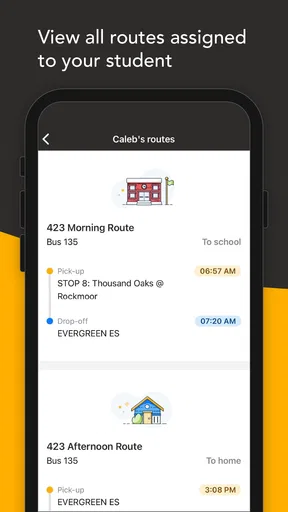
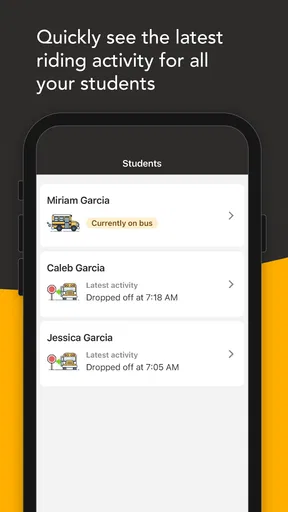
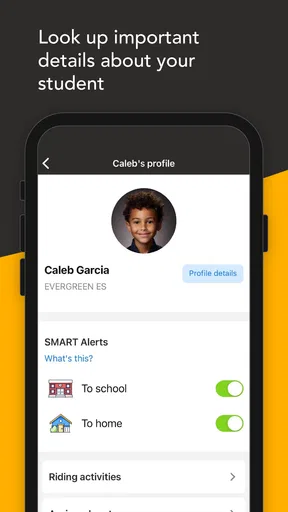
Our Review of SMART tag™ Parent App
 Analysis by Appyee
I approached SMART tag™ Parent App as a practical education tool rather than another general-purpose messaging app. Its purpose is to help with student management and notifications, so the real question is not whether it has the largest feature list, but whether it can make school-related communication easier for the people who actually need it. In my experience, that makes the app most interesting for parents who want a focused place for student updates instead of searching through unrelated conversations, emails, or paper notices.
The app is free, is rated for Everyone, and comes from SMART tag. It belongs to the education category and has passed the early stage of being a little-known download, with over one hundred thousand installs. That level of adoption does not automatically make it the right choice for every family, but it does suggest that the basic idea is useful to a meaningful number of parents and students.
How I would decide whether SMART tag™ Parent App fits
I would judge the fit by whether this app becomes the dependable first stop for school-related updates, rather than by how often I open it. The key distinction is whether its alerts lead to clearer follow-through or simply add another place to check. With that practical test in mind, it is easier to see why a focused parent tool can work better than broader alternatives in some households.
Start with the communication problem
I would not install this app simply because it is labeled as an education app. I would first ask what kind of problem I am trying to solve. If my main need is receiving student-related notifications and keeping track of school management information, a dedicated parent app makes sense. If I am looking for homework help, live tutoring, classroom collaboration, or a full learning platform, this is probably the wrong category of tool.
That distinction matters because many education apps look similar from a distance while serving completely different jobs. A learning platform is built around lessons and assignments. A family calendar is built around schedules. A messaging service is built around conversations. SMART tag™ Parent App is better understood as a communication and management companion for parents, where timely notices are more important than study content.
Before relying on it, I would also consider whether my child’s school or organization actually uses the SMART tag system. A parent-facing app can only be useful when there is a connected school workflow behind it. Installing it may be easy, but the value comes from receiving relevant student information through the service, not from opening an empty standalone application.
What the rating tells me, and what it does not
The current average is 3.6 from more than three hundred ratings, with over two hundred written reviews. I read that as a mixed but usable signal. It is not the kind of score that encourages me to promise a flawless experience, yet it also does not suggest that the app is universally failing. For a school communication app, ratings can reflect many things beyond the interface itself, including account setup, school configuration, notification timing, and how clearly families understand the service.
That is why I would judge it by a simple test: can I connect the correct student information, receive an important notice, and understand what action is expected without extra searching? A parent who needs dependable clarity should care more about that workflow than about a polished-looking home screen.
The first setup deserves attention
My advice is to set it up at a calm moment rather than five minutes before leaving for school. Have the student details or connection information supplied by the school ready, check that the selected student is the correct one, and review the notification behavior on the phone. A mistake at this stage can make the app appear unreliable when the real issue is that the wrong student or account has been connected.
This is one of the less obvious trade-offs of a school-linked app: the parent may control the phone, but not every part of the information flow. School staff, account records, and the app all have to line up. If a notice seems missing, I would first check the selected profile and the phone’s notification settings before assuming the service itself is broken.
A realistic everyday use case
Imagine a parent who works during school hours and cannot keep checking a school website. A notification arrives while the parent is commuting, so it is read later during a lunch break. Instead of trying to remember which message contained the update, the parent can use the app as the first place to review the student-related information. That small reduction in searching is the main benefit I see here.
The same workflow can help in a household where more than one adult shares responsibility. Rather than forwarding every school notice manually, each person can use the parent-facing service in the way intended by the school. I would still agree on who handles follow-up actions, because an app can improve visibility without solving family coordination by itself.
Where the focused design is more useful than usual alternatives
The comparison is less about having more features and more about reducing the chance that a student notice gets lost among unrelated messages. I find that focused design most useful when a school already uses the connected system and the family wants a simple routine for acting on updates. The trade-off becomes clearer when we look at what broader tools handle better.
It keeps school notices separate from noisy inboxes
The strongest reason to choose this app is focus. Email inboxes are flexible, but they are also crowded. A school message can be buried between receipts, work mail, newsletters, and personal conversations. A general messaging app has the opposite problem: it may be fast, but important information can disappear among casual chats.
A dedicated student-management app gives school communication its own place. That is especially valuable for parents who do not want to create elaborate email folders or maintain a separate spreadsheet of school contacts. The advantage is not that the app replaces every other communication channel; it is that it gives student-related notifications a clearer home.
It is more appropriate for notices than for learning
I would choose SMART tag™ Parent App over a homework platform when my priority is staying informed about student management matters. I would not choose it instead of a learning-management system when I need lesson materials, assignment submission, grades, or teacher collaboration. Those are different jobs, and forcing one app to handle all of them usually makes the experience harder to understand.
This is also why the app may feel limited to someone expecting a complete family education dashboard. Its value is narrow by design. The narrower the need, the more convincing the fit becomes; the broader the expectation, the more likely I am to recommend combining it with the school’s other official tools.
Useful habits that make the app easier to live with
I would create a simple notification routine. When an alert arrives, I would read it fully, identify whether it requires an action, and then mark that action in the family’s usual calendar or task system. I would not treat the app as a permanent memory replacement. Notifications are good at bringing information to attention, but they are not always enough for deadlines that matter several days later.
A second useful habit is checking the app before contacting the school about a notice that appears confusing. The original context may answer a question that would otherwise lead to an unnecessary call or message. This is a modest benefit, but it can save time for both parents and school staff.
A third is keeping the app limited to its intended role. I would avoid using screenshots or forwarded fragments as the family’s only record of an important instruction. If a notice affects transportation, attendance, or another practical responsibility, I would write down the action separately. That approach protects against the common mistake of seeing a notification and then forgetting what it required.
Version and device considerations
The current version is 1.5.1, and the app requires Android 7.0 or later. That makes it accessible on many Android phones, including devices that are not especially new, although compatibility alone does not guarantee an equally smooth experience on every handset. I would update the app when an update is available and keep the phone’s notification settings in mind, particularly if battery-saving features restrict background activity.
Because this is a parent-oriented tool, the phone itself may be shared, replaced, or used by several adults over time. Before changing devices, I would make sure I know the account or school connection details needed to restore access. The cost of switching phones is usually not the download; it is the risk of missing an important notice while rebuilding the setup.
Where another category may be better
If the school already communicates mainly through email and the family has a reliable filing system, adding another app may create more places to check rather than less. In that situation, the app’s focused structure may not justify the extra habit. A family calendar can also be better for turning notices into shared appointments, while a general messaging service may be better for direct questions that require a conversation.
For parents who need detailed academic progress, a school portal designed around grades and assignments will likely provide more useful depth. For students who need explanations or practice, an educational content app is the more sensible choice. SMART tag™ Parent App should complement those tools when necessary, not be judged as though it were trying to replace them.
The practical cost of changing systems
Since the app is free, the main cost of trying it is time and attention rather than money. I would still avoid switching every family communication habit at once. Start by using it for the notices it is meant to handle, while keeping the existing calendar or email process for longer-term planning. After a week or two of normal school activity, it becomes easier to tell whether the app has reduced missed information or merely added another inbox.
There is also a social cost to changing systems. If one parent checks the app, another checks email, and a student relies on a school portal, everyone may assume someone else has seen the same update. I would agree on one simple rule: the person who notices an action item records or confirms it for the household. That rule is more important than choosing a particular app.
For schools or organizations that already use SMART tag, staying with the connected parent app may be less disruptive than asking families to recreate the same communication flow elsewhere. For a family whose school does not use that ecosystem, the benefit may be too limited to justify changing established routines.
My honest recommendation
I recommend SMART tag™ Parent App to parents whose school uses it for student management and notifications, especially those who regularly miss school emails or want a dedicated place to check student-related updates. Its free price and Everyone age rating make it easy to try, and its focused purpose is more useful than a broad feature list would be for this particular job.
I would recommend it with realistic expectations. Do not install it expecting lessons, tutoring, a complete calendar, or an all-in-one academic record. Treat it as a channel for staying informed, then move important actions into the family system that already works. That combination gives the app a clear role without asking it to do work it was not designed to handle.
I would skip it when the school does not rely on SMART tag, when email already provides a dependable and well-organized workflow, or when the real need is academic rather than administrative. I would also hesitate if the household is unwilling to check another source of notifications. A dedicated app only helps when it becomes part of a consistent routine.
Overall, my view is cautiously positive. The 3.6 average shows that the experience is not universally smooth, so I would pay attention during setup and test whether notices arrive in a way that fits daily life. But for the right school connection, the app’s biggest strength is giving student communication a focused place. That is a modest goal, yet it can make a noticeable difference for a parent who needs timely information without digging through a crowded digital life.
Verdict
Strengths of SMART tag™ Parent App
- Real-time location updates help parents check a child’s whereabouts quickly.
- Geofence alerts can notify you when a tagged person leaves or enters a chosen area.
- Supports multiple family members and connected SMART tag devices in one account.
- Low-power tracking is designed to extend the tag’s battery between charges.
- Simple controls make basic tracking features accessible to less technical users.
Limitations of SMART tag™ Parent App
- Location accuracy may decrease indoors or in areas with weak GPS coverage.
- The tag and app require a compatible SMART tag device to provide tracking features.
- Some features may depend on an active mobile data or Wi-Fi connection.
- Frequent location updates can reduce the tag’s battery life more quickly.
- Privacy and consent should be discussed before tracking another person’s location.
Similar Picks in This Category
View All
Duolingo: Language Lessons
Duolingo4.7

Google Classroom
Google LLC2.8

Unacademy: Learn & Crack Exams
Unacademy3.2

Bible App for Kids
Life.Church4.4

Cake - Learn English & Korean
Cake Corp.4.7

Brainly: AI Homework Helper
Brainly4.5
Frequently Asked Questions
What is the SMART tag™ Parent App used for?
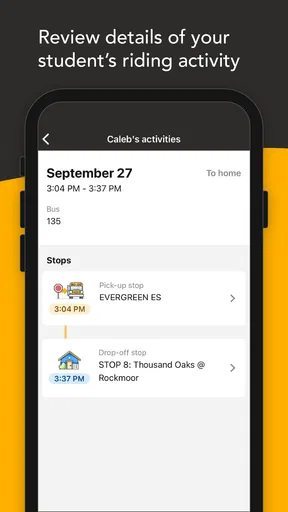
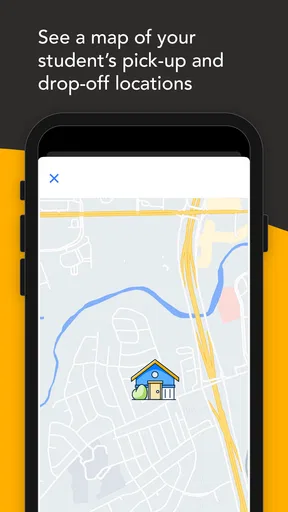
The SMART tag™ Parent App is designed to help parents manage and monitor compatible SMART tag devices, commonly used with children’s school transportation services. After signing in, parents can typically view transportation details, receive notifications, check pickup or drop-off information, and access updates provided by the participating school or transportation provider. The available functions may vary depending on the organization using the system.
How do I sign in to the SMART tag™ Parent App?
Access to the app is generally provided through a school, district, or transportation organization that uses the SMART tag platform. You may need an invitation, registered email address, username, password, or activation code supplied by the organization. If your credentials do not work, the app itself may not be able to resolve the issue; contact your school or transportation administrator to confirm that your account and child information have been correctly enrolled.
Can I track my child’s school bus in real time?
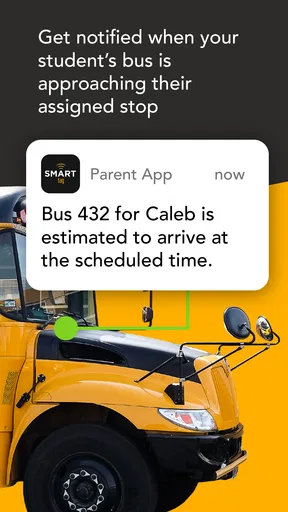
The SMART tag™ Parent App may provide bus location, route progress, estimated arrival information, or boarding and exiting notifications, but these features depend on the school district’s setup and the equipment installed on the vehicle. Tracking may occasionally be delayed or unavailable because of weak cellular coverage, GPS limitations, route changes, or technical issues. The app should support transportation awareness, but it should not replace official school communications.
What notifications can parents receive from the app?
Depending on the transportation provider’s configuration, parents may receive alerts related to bus arrivals, route changes, delays, cancellations, boarding, or a child being recorded as entering or leaving the vehicle. Notification behavior can also depend on your phone’s permissions and internet connection. After installation, review the app’s notification settings and your device’s system permissions so important transportation updates are not accidentally blocked.
Is the SMART tag™ Parent App free and what should I check before downloading it?
The app may be available to download without a separate purchase, although access to its services usually depends on participation by your child’s school or transportation provider. Before downloading, verify that the developer name, app icon, and platform listing match the official SMART tag™ Parent App. Also check device compatibility, required permissions, privacy information, and whether your school has already activated your family account.
